This guide covers the path from a new account to an editable first game. It is the only tutorial that starts before the workspace; once it is complete, continue with Projects & Workspaces and the rest of the course.
Create or enter an account
On the Create your account screen, choose Continue with Google or enter an email address, a password, and its confirmation, then press Sign up. Email passwords must be at least eight characters and contain a letter. The app points out both requirements while you type.
If you opened ShuffleKit from a link inside another app, such as Instagram, TikTok or Facebook, you are in that app's built-in browser, and Google usually refuses to sign anyone in there. The sign-up and sign-in pages say so with a notice headed You're inside another app's browser. Open the page in Safari or Chrome from the app's menu, use Copy sign-in link and paste it into your browser, or choose Use email instead and sign up with an email address, which works in any browser.
For an email sign-up, open the confirmation message and follow its link before trying to work in the app. The Check your email page is a waiting state, not an error. If the message is not in your inbox, check spam, then use Send it again on that page for a fresh link.
Returning users can sign in on Sign in to ShuffleKit with Google or their email and password. An invalid-password response does not erase the email field, so correct the credential and submit again. If you sign in before confirming your email, the sign-in page tells you and offers Send a new confirmation link.
Recover access safely
From sign-in, choose Forgot your password? to reach Reset your password, enter the account email, and press Send reset link. The page then tells you to check your email. The link in that email opens the new-password page, where you enter the replacement under New password and Confirm new password, then press Update password. The new password follows the same rule as sign-up: at least eight characters, including a letter.
An email link works once. If you open one that was already used or has expired, you land on the sign-in page with a note saying so; if your email is already confirmed, just sign in. An expired reset link sends you back to Reset your password with a note, and the new-password page offers Request a new link. If you open an old link while already signed in, a page headed This link no longer works explains whether you need to do anything.
Other sign-in problems land on an error page that says what happened. A link that no longer works, or a connection that could not reach the server, offers Go to sign in; in the second case your link should still work, so open it from your email again. A Google sign-in that did not finish offers Try again and Sign up with your email instead. Do not send a reset link or password to someone else; the address owner must open it. Once signed in, you can also change the password in Settings.
Complete the first-game guide
New accounts enter a five-step onboarding flow, with a Step 1 of 5 counter and a progress bar at the top and Back and Continue at the bottom. The first two steps help tailor the starting context; select the answers that are true now, not an idealized future process.
- What's been the hardest part of making your card game? Pick at least one: Artwork & visuals, Balancing mechanics, Writing rules, Card layouts, Playtesting, Printing costs, or Where to start.
- What have you been using to build your game? Pick any that apply, or none: Illustrator / Photoshop, Canva, Excel / Google Sheets, Word / Google Docs, Print services (MPC, etc.), Tabletop Simulator, or Nothing yet.
- Create your first project: a name and a genre, then Create Project. The genres run from Trading / Collectible through Deck-builder, Party / Social, RPG cards, Tarot / Oracle, Flashcards / Educational, Co-op / Adventure, Narrative / Storytelling, Hidden role / Deduction, Kids / Family, Business / Utility and Traditional / Trick-taking to Other. You can edit these details later, so choose a recognizable working name and move forward. If you come back to this step, the button reads Save & Continue.
- How do you want to start? Choose one of three starting paths:
| Path | Best for | What happens next |
|---|---|---|
| Import from CSV | You already have a spreadsheet of cards. | Upload a CSV, JSON or Excel file, review the rows and columns, and press Import with the card count. Each column becomes a card property. If the columns look wrong, Try smart importing reads the file again; Choose a different file starts over, and Replace file swaps an earlier import. Then Continue to layout. |
| Create with AI | You can describe the game but have not built its cards. | Pick a layout on the next step and, optionally, describe your game. ShuffleKit writes four starter cards with artwork to fit that layout. Review every generated value before treating it as a rule. |
| Start empty | You want full control from the beginning. | Pick a layout or a template pack, then create card data yourself. |
If you go back and pick a different path after importing or generating cards, Switch start method? asks first, because switching discards those cards, their properties and any layout made for them. Keep it cancels; Discard & switch goes ahead.
- The final step, the layout, depends on the path:
- Import from CSV: ShuffleKit builds a card layout from your columns and from what your cards actually hold in them. Choose a style (Classic, Modern or Minimal), turn Include artwork space on or off, and flip through your own cards in the preview. Then press Use this layout & finish.
- Create with AI and Start empty: pick one of four Starter layouts chosen for your game, or a pack under Template packs. A pack installs whole, with every front and back in its set and its columns. On the empty path it also brings sample cards you can edit; on the AI path your starter cards are written into the pack's columns. Then press Generate cards & finish or Create layout & finish. On the empty path, Skip gives you a plain default layout instead.
The workspace then opens to Cards, where the normal tutorials take over. On the AI path the starter cards and their art keep arriving for a few moments after Cards opens.
If you leave midway
You can return to a partially completed onboarding flow; the guide restores its progress when it can. If a project creation step reports an error, correct that before continuing, because later steps need a valid project. Once onboarding is complete, the app sends you to Cards instead of restarting the guide on normal navigation.
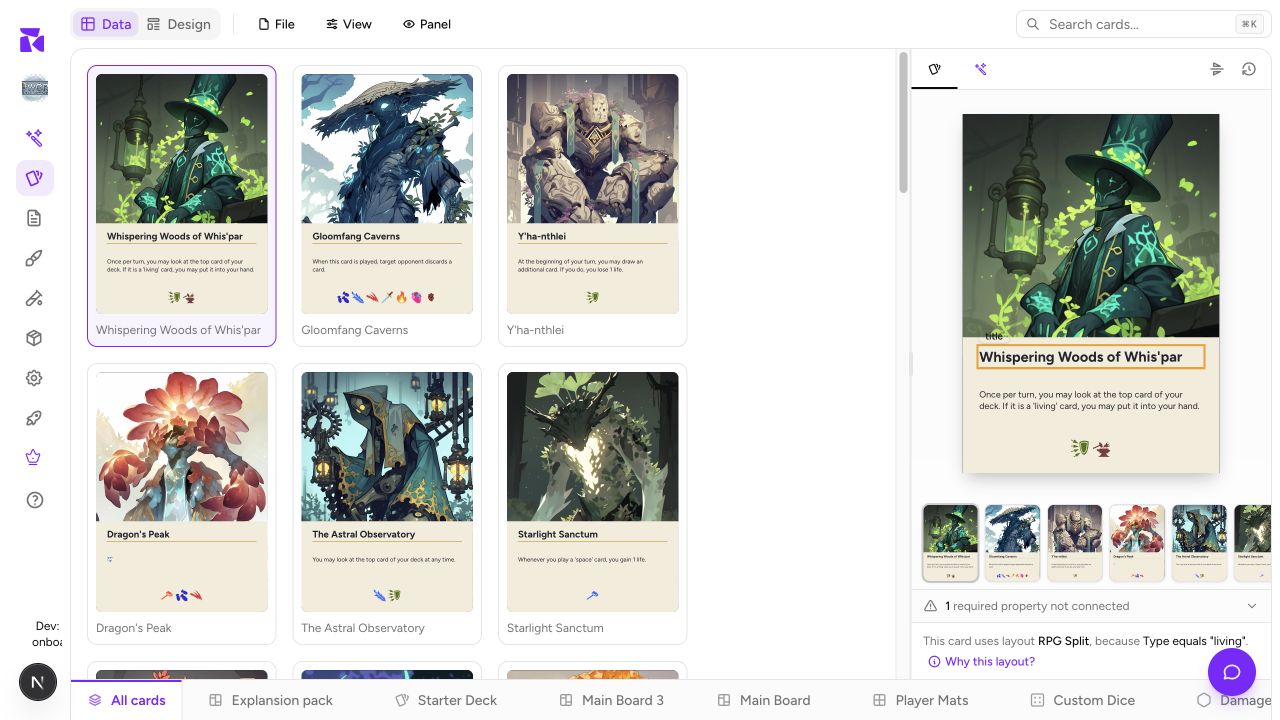
The onboarding flow establishes a first card collection. To add boards, tokens, custom dice, and other physical pieces afterward, use Components & Collections.