
Plotwright Blank Game Board Template
by ShuffleKit
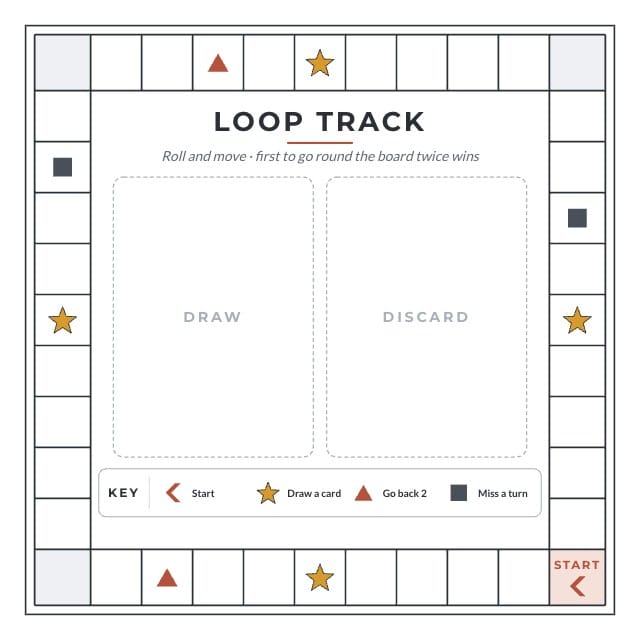
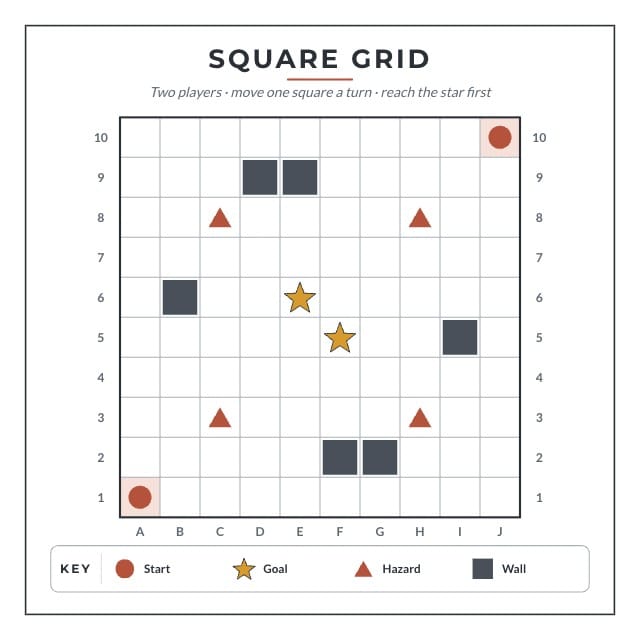
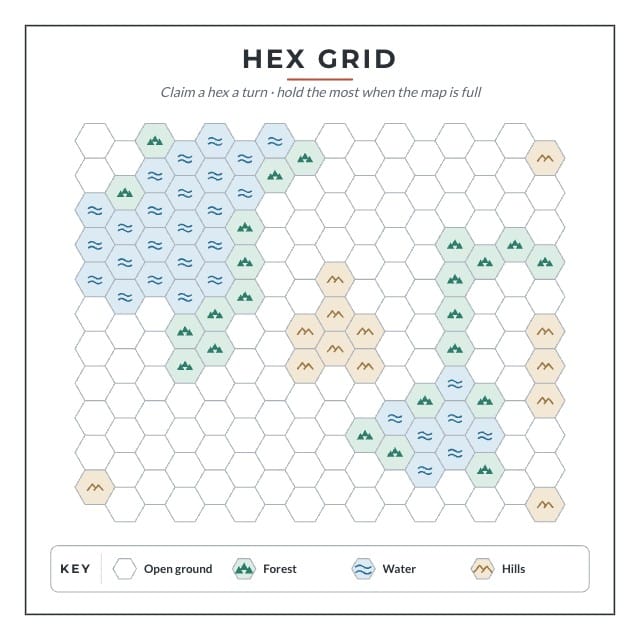
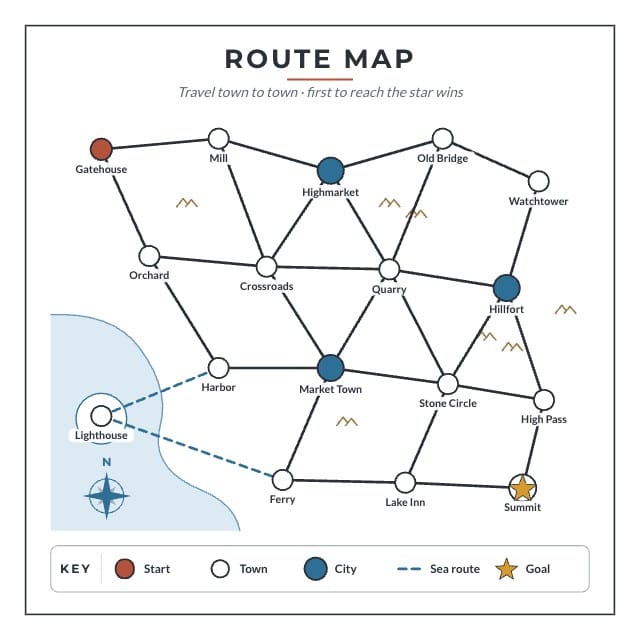
A board game board template for a game of your own: a square grid, a hex grid, a loop track and a route map, each with a title and a key to retype. Four blank game boards at 8 × 8 inches, drawn in dark ink on white so they print on a home printer and take a pencil: a ten-by-ten grid lettered A to J and numbered 1 to 10, a map of 176 hexes with patches of forest, water and hills, a loop of 40 spaces round the edge with a draw pile and a discard pile in the middle, and seventeen towns joined by roads and two sea routes. Each board has its name and a one-line goal across the top and a key along the foot, and the key's words and the map's place names are text you can click and retype. The Board Type column picks which board a row gets, and the four share one back. Comes with four sample boards, one of each.
- Designs
- 5
- Sample boards
- 4
- Board size
- Square Board — 8 × 8 in
- 203.2 × 203.2 mm · 2400 × 2400 px at 300 DPI
- Board fields
- Name
- Subtitle
- Board Type
Adding a template copies its designs, fields, and sample boards into your own project. Your copy is yours, and later changes by the author never touch it.
Part of game board templates
What’s in Plotwright Blank Game Board Template
Five designs: Square Grid, Hex Grid, Loop Track, Route Map and Board Back.
Your boards live in a sheet, one row each, with a column for every field the designs read: Name, Subtitle and Board Type. Four of those rows arrive filled in, so there is something on the design before you type a word.
How to make a game board from this template
- Pick the board whose movement fits your game: the square grid for exact positions, the hex grid for claiming ground, the loop track for roll and move, the route map for travel between places. Set Board Type on the row and the row draws on that board.
- Type your game's name and its goal into the row. They print in the band across the top, and a second row is a second board.
- Click a word in the key to change what its symbol means, and on the route map click a place name to rename it. Each kind of marked space is one layer, so you can recolour or delete a kind at once and add marks of your own with the shape and icon tools.
- Print it on plain paper and play a few rounds before you add any art. When the board holds up, lay your own artwork or colours over it and export a print PDF, or order it as a rigid board.
Printing at square board size
Square Board: 8 × 8 in, 203.2 × 203.2 mm, 2400 × 2400 pixels at 300 DPI.
On the Hobby plan, export a print-ready PDF with bleed and cut lines. PNG and SVG come out at the same size, which is what Tabletop Simulator wants. On Indie, send it to a print-on-demand partner through Print & Ship.
A printer asks for an eighth of an inch of bleed on every edge on top of those numbers, so this board goes out as 2475 × 2475. The export adds it. Let the artwork run into the bleed and keep the text inside the cut line, and nothing arrives trimmed.
Questions about Plotwright Blank Game Board Template
Everything you need to know before getting started.
Still have questions? Contact us
How do I make a board for my own board game?
Start from how the pieces move, because that decides the board. Pieces that stand on exact squares want a grid, games about holding ground want hexes, roll-and-move games want a track, and games about getting from place to place want a map of routes. Write the goal at the top, put only the marked spaces your rules use, and playtest it on paper before any artwork goes on.
What size should a game board be?
For a prototype, 8 × 8 inches: it fits one sheet of Letter (A4 leaves a thinner margin) and is The Game Crafter's square board, which these boards are. A board in a boxed game is usually much bigger, often 18 to 20 inches across once unfolded. In ShuffleKit you can set a board to a bigger preset, up to the 18 inch quad-fold, but a home printer can't print those on one sheet, so a big board is one you order printed.
Can I print the board blank?
Yes. Clear the name and the goal in the sheet and they print empty, and delete the key's words in the editor for a board with nothing written on it. A print PDF from ShuffleKit needs the Hobby plan. For plain boards to draw on with no account at all, the game board templates page has five blank boards as free PDFs. Free blank game boards.
What happens when I add Plotwright Blank Game Board Template to a project?
The five designs, the three fields and the four sample boards are copied into a project of yours, with the fields already pointed at the design. Nothing stays linked to this page afterwards, so the author's later edits never reach your copy.
What size does Plotwright Blank Game Board Template print at?
Square Board size: 8 × 8 in, 203.2 × 203.2 mm, 2400 × 2400 pixels at 300 DPI. Those are the numbers to hand a print shop, and the ones to check a sleeve against.
Is Plotwright Blank Game Board Template free?
Yes. Adding it, editing it, filling it with your own cards and playtesting it online are all free. Exporting print files starts on the Hobby plan, and Print & Ship through The Game Crafter is on Indie. No template sits behind a paid plan.
Can I change the designs?
Yes. They land in your project as ordinary layouts, so you can drag an element somewhere else, put your own art behind the frame, restyle the type or rename a field. Edit a design once and every board on it follows.
Can I use my own boards instead of the samples?
Yes — the samples are rows in a sheet, and they are there to be overwritten. Type over them, add rows of your own, or bring a CSV and match its headers to the fields.
Can I sell a game made with Plotwright Blank Game Board Template?
Yes. This one is ours, and you keep commercial rights to what you build from it, crowdfunding and retail included.
Ready to make your own board game?
This template is free, and so is the editor it opens in.